
Transform audio recordings into professional transcripts and actionable AI memos using Google’s Gemini. AI memo generator for business now has a built-in recording capability!
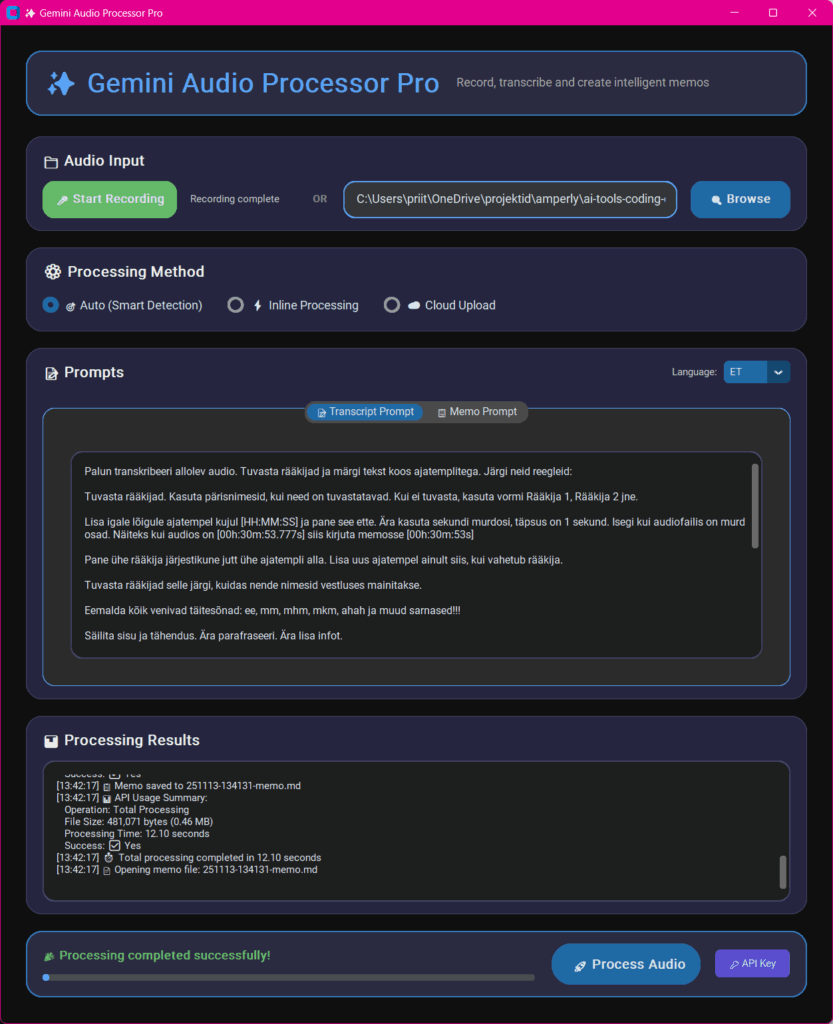



✨ AI Memos Key Features
- 🎤 Built-in Recording – Record meetings directly with one-click start/stop
- 🎯 Smart Audio Processing – Automatic detection of optimal processing method
- 📱 Speech-Optimized – 22kHz mono recording perfect for meetings
- 💾 Efficient MP3 Encoding – Small file sizes without external dependencies
- 📁 Organized Storage – Auto-creates recordings folder with timestamped files
- 🎨 Modern UI – Clean dark-themed interface with real-time progress tracking
- 🌍 AI Memos Multi-Language Support – Estonian and English prompts with easy language switching
- ⚡ Multiple Processing Methods – Inline, cloud upload, or auto-detection
- 📝 Configurable Prompts – Customize transcription and generate AI memos
- 🔊 Wide Audio Support – MP3, WAV, M4A, OGG, FLAC, AAC formats
- 📋 Markdown Output – Professional memo format with timestamps and action items
- 🛡️ File Validation – Comprehensive format, size, and integrity checking
- 📊 API Usage Tracking – Real-time token counts and processing statistics
- 🔄 Real Progress Bar – Step-by-step progress indication during processing
- 🔑 Built-in API Key Manager – Easy setup and management of Gemini API keys
🚀 Prerequisites
- Python 3.8+
- Google API Key – Get one for free from Google AI Studio
- Required packages:
pip install customtkinter google-generativeai pillow sounddevice scipy numpy lameenc
How to use AI memo writer: Setup AI Memos
- Clone the repository:
git clone https://github.com/priit2000/memomaker.git cd memomaker - Set your Gemini API key:
export GEMINI_API_KEY="your-api-key-here"Or on Windows:
set GEMINI_API_KEY=your-api-key-hereOr use the built-in API key manager: The app will show a setup dialog if no API key is found.
- Run the application:
python memomaker-ui.py
🎯 How to Use AI memos
Recording Mode (New!)
- Launch the app – Run
python memomaker-ui.py - Start recording – Click “🎤 Start Recording” button
- Record your meeting – Speak clearly into your microphone
- Stop recording – Click “🛑 Stop Recording” when finished
- Auto-processing – App automatically processes the recording and generates transcript + memo
- View results – Files saved in
recordings/folder with timestamp naming
File Processing Mode
- Launch the app – Run
python memomaker-ui.py - Select audio file – Click “Browse” and choose your audio file (or click the file path field)
- Choose language – Select Estonian (ET) or English (EN) from the language dropdown
- Choose processing method:
- 🎯 Auto – Smart detection based on file size
- ⚡ Inline – Fast processing for smaller files (<20MB)
- ☁️ Cloud Upload – Better for larger files (>20MB)
- Customize prompts (optional) – Edit transcription and memo prompts in the tabs
- Process – Click “Process Audio” and watch real-time progress
- Manage API key (optional) – Click “🔑 API Key” button to view/edit your Gemini API key
- View results – Files saved in
recordings/folder with organized naming - Monitor usage – View detailed API usage statistics including token counts in the results area
CLI Mode
python memomaker-ui.py audio_file.mp3 [--method auto|inline|upload] [--prompt "custom prompt"]
📁 File Structure
memomaker/
├── memomaker-ui.py              # Main application
├── transcription-prompt-et.md   # Estonian prompts
├── transcription-prompt-en.md   # English prompts
├── .gitignore                  # Git ignore rules
├── README.md                   # This file
└── recordings/                 # Auto-created folder for all outputs
    ├── 241113-143022-recording.mp3    # Recorded audio
    ├── 241113-143022-transcript.txt   # Generated transcript
    └── 241113-143022-memo.md          # Generated memo
📊 Key Features Detailed
🎤 Built-in Audio Recording
- One-click recording: Start/stop with visual feedback
- Speech-optimized: 22kHz mono recording perfect for meetings
- Efficient encoding: Direct MP3 encoding with lameenc (no external tools needed)
- Auto-processing: Automatically processes recorded audio when recording stops
- File size optimization: ~1MB per minute vs ~10MB for standard recording
📁 Organized File Management
- Auto-folder creation:
recordings/folder created automatically - Timestamped naming:
yymmdd-hhmmss-[type]format for easy organization - Session grouping: All files from same recording session have matching timestamps
- Example:
241113-143022-recording.mp3,241113-143022-transcript.txt,241113-143022-memo.md
⚙️ Configuration
Settings (Top of memomaker-ui.py)
# API Configuration
API_KEY = os.environ.get("GEMINI_API_KEY")

# Model Settings
MODEL_NAME = 'gemini-flash-latest'

# File Processing Settings
INLINE_THRESHOLD = 20 * 1024 * 1024  # 20 MB
MAX_FILE_SIZE = 100 * 1024 * 1024     # 100 MB max
MIN_FILE_SIZE = 1024                   # 1 KB min

# UI Settings
WINDOW_WIDTH = 1000
WINDOW_HEIGHT = 800
Multi-Language AI Memo Prompts
The app automatically detects and uses language-specific prompt files:
- Estonian:
transcription-prompt-et.md - English:
transcription-prompt-en.md - Future:
transcription-prompt-fr.md,transcription-prompt-de.md, etc.
Each file contains:
- Transcription rules – Under
# Transkriptsioon/# Transcriptionsection - Memo format – Under
# Memosection
📝 AI Memos Output Examples
Transcript Format
[00h:02m:15s] Priit Kallas: Alustame tänase koosoleku. Päevakorras on kolm punkti.
[00h:02m:28s] Henrik Aavik: Tänan. Kas võiksime alustada eelmise nädala tulemustega?
[00h:02m:45s] Priit Kallas: Kindlasti. Numbrid on väga head...
AI Memo Format (Markdown)
- Structured sections: Participants, summary, decisions, actions
- Timestamps: References to specific moments in audio
- Action items: Clear responsibilities and deadlines
- Multi-language: Professional business language (Estonian or English)
- Markdown format: Easy to edit and convert to other formats
🔧 Troubleshooting
Common Issues
“No module named ‘customtkinter'”
pip install customtkinter sounddevice scipy numpy lameenc
“Invalid API key”
- Verify your Google API key is correct
- Check environment variable is set:
echo $GEMINI_API_KEY(Linux/Mac) orecho %GEMINI_API_KEY%(Windows) - Use the built-in “🔑 API Key” button to set up your key
“File validation failed” errors
- Check file format (supported: MP3, WAV, M4A, OGG, FLAC, AAC)
- Ensure file size is between 1KB and 100MB
- Use “Upload” method for files > 20MB
- Consider compressing large audio files
“Recording not working”
- Check microphone permissions in your system settings
- Install audio dependencies:
pip install sounddevice scipy numpy lameenc - Test microphone with other applications first
Performance Tips
- Use built-in recording for optimal file sizes and quality
- Recording produces ~1MB per minute vs ~10MB for standard recording
- Compress large files before processing
- You can change the Gemini model in the variables section of the py file
📋 Roadmap
- Built-in recording – Direct audio capture (completed)
- MP3 optimization – Speech-optimized recording (completed)
- Organized file structure – Timestamped file naming (completed)
- Batch processing – Process multiple files
- Export formats – PDF, Word, plain text
- Audio player – Built-in playback with waveform
- Cloud storage – Direct integration with Google Drive/OneDrive
- Multi-language – Estonian and English support (completed)
- Additional languages – French, German, etc.
- Templates – Custom memo templates
⚠️ Security & Privacy
- API keys are stored locally as environment variables
- Audio files are processed according to Google’s privacy policy
- No data retention – Files are not stored after processing
- Local processing – Transcripts and memos saved locally
- Recordings stay local – All recorded audio stored in local recordings folder
📄 License
MIT License – see LICENSE file for details.
📊 API Usage Tracking
- Real-time statistics displayed in results area
- Token counts: Input, output, and total tokens
- Processing time: Detailed timing for each operation
File Validation
- Format checking: Validates audio file extensions and MIME types
- Size limits: Enforces minimum (1KB) and maximum (100MB) file sizes
- Integrity checks: Basic corruption detection
- Clear error messages: Specific validation failure details
🙏 Acknowledgments
- Google Gemini AI – For powerful audio processing capabilities
- CustomTkinter – For modern UI components
- LAME MP3 Encoder – For efficient audio compression